Random Maps v4 ready to try out: Read more

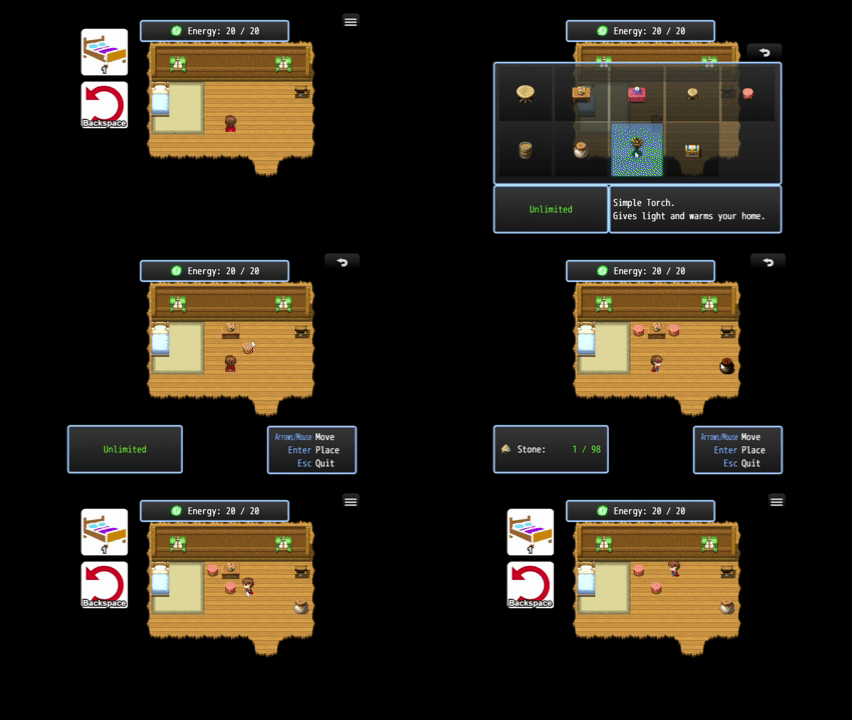
This plugin lets the player customize their homes by placing furniture anywhere on the map. Extra features, such as „variants“, the furniture selection window, material costs, and a stamina system, make it a complete system to integrate into your game!
Features
- Let the player place pre-defined „furniture“ events anywhere on the map
- Furniture objects can have variants and also be rotated while building
- The player can move and disassemble furniture, and also recycle their materials
- Build materials, required gold
- Stamina system
- A build menu, displaying the furniture and its building costs
- Mouse and Touch Support!
Sandbox & Furniture
Both plugins work similarly but have different focuses.
Of course, you can easily use both plugins in your game!
The Sandbox allows the player to modify the ground and B-layer tiles, and put events anywhere on the map. Assets can have any size (e.g. a wall that is 2 tiles high). The player may use the eraser tool to revert changes; however, materials are not refunded.
The Furniture system allows the player to place pre-defined events on the map. The player may re-position (move) them or disassemble them while its build materials are refunded (unless you, as the game dev, choose otherwise). The furniture system also includes „variants“ and „rotate“ features.
| Sandbox | Furniture | |
|---|---|---|
| Activities | Modify ground tiles, B-layer tiles, and place events | Place events |
| Sizes | Any size (e.g. 2×2) | 1×1 only |
| Cycle variants and rotate event while building | No | Yes |
| Revert Changes | Eraser Tool (only 1×1) | Player can move and disassemble objects |
| Recycle Materials | No | Yes |
Trial Version
This plugin offers a free trial version. This is the perfect chance for you to try it out and check whether this plugin works with your current project. It provides all the features from the full version; however, it comes with some limitations:
- Furniture Events are not memoized
Import Plugins and unlock to Full Version
Import these plugins and order them by the „Tier“ tag.
- MK_MapManipulation
- MK_SpawnEvents
- MK_FurnitureSystem
- MK_FurnitureMenu
- MK_FurnitureSystem_Unlocker (comes with the full version)
Unlock full version: The full version comes with a „MK_FurnitureSystem_Unlocker“ plugin. Just import it into your project.
Get Started
We recommend opening the sample project that comes with your download (It doesn’t matter whether you downloaded the free trial or already purchased the full product).
Source Maps
Everything that the player can build is defined on so called „Source Maps“. Prepend the ! or $ symbol to a map name so the plugin knows that it should preload these maps.
- When using ! the plugin loads this map when it’s a child map of the map where the player is right now.
- When using $ the plugin loads this map on game start, so it is always available.

As you can see, you can pre-load multiple source maps as long as they don’t share the same name.
Ensure that you don’t pre-load maps sharing the same name. The plugin treats „! objects“ and „$ objects“ as the same (and therefore does not allow it), although they have different symbols.
Anatomy of a Source Map
Example:
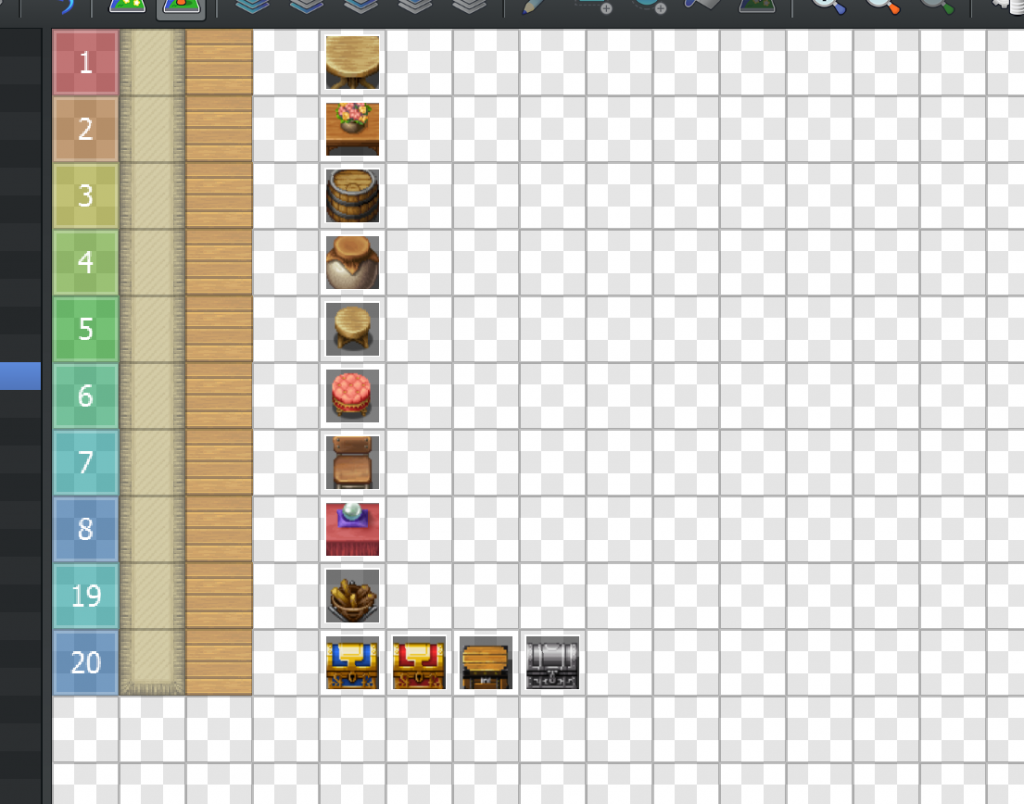
A source map contains at least one row („asset“) which consists of the following:
- 1×1 Region Tile: To assign your asset to a number; therefore, every number must be unique but can be freely chosen otherwise
- One or multiple tiles: These „matchers“ define where this asset can be built later in the game
- Exactly one blank tile
- One or multiple events: This is the event that is built in the game
- If multiple events are placed: These are now considered as „variants“. The player can then choose which variant to build by pressing a certain action key (by default, the letter V or the mouse wheel)
In contrast to the Sandbox engine and Random Maps, only 1×1 assets and only events are supported.
Inside a Furniture Event
A „furniture“ event is simply a regular event with some additional features:
- Calling
this.moveFurniture()inside an event instantly switches into furniture placement mode and lets the player move this event - Calling the event command „erase command“ disassembles the event and furthermore, refunds materials and gold that the player spent before (this can be disabled inside the furniture plan in the plugin manager)
An event page could look like this, but of course, you can handle the eventing however you prefer.
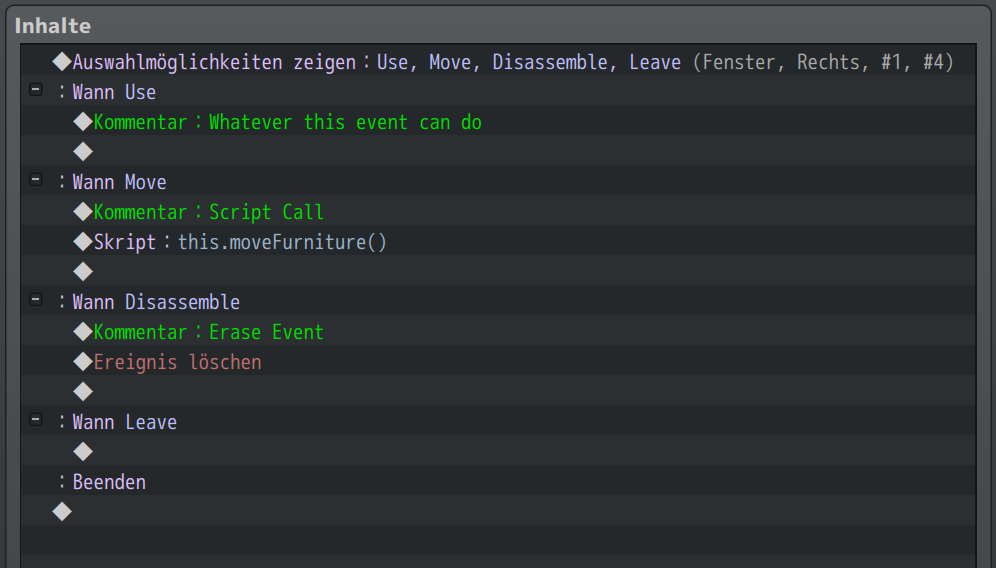
To move this event:
this.moveFurniture()To disassemble this furniture and recycle materials:
Event Call: Erase Command
Furniture Plans
A furniture plan (sometimes called „blueprint“) wraps up an asset and extends it with additional information such as name, category, costs to build, and more. You define them in the plugin manager.
Learn and Forget Plans
You can choose from two ways to manage blueprints in your game. Choose as you prefer.
Via Note Tags
Add <Furniture: x> to items in the database. As long as your party owns it the player can use this blueprint.
Via Commands
MZ users: You can use plugin commands to add/remove blueprints.
MV users: You can use these scripts:
$gameParty.learnFurniturePlan("table")
$gameParty.forgetFurniturePlan("table")
Variants
You, as the game developer, can add „variants“ to a furniture by simply pushing another events to the same row on the asset map.
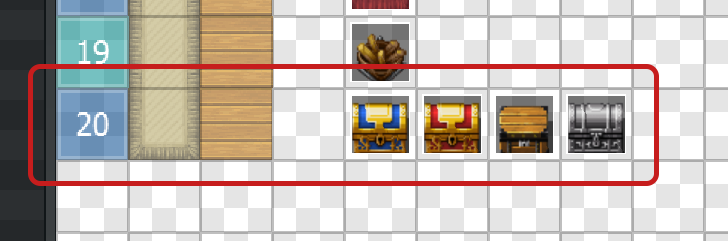
Therefore, all variants share the same Region ID and furniture plan (building costs, etc.). The player can then cycle through all variants by pressing a certain action key (by default, the letter V or the mouse wheel).
Make Furniture Rotatable
You can make a furniture „rotatable“ by enabling a switch in the furniture plan in the plugin manager.
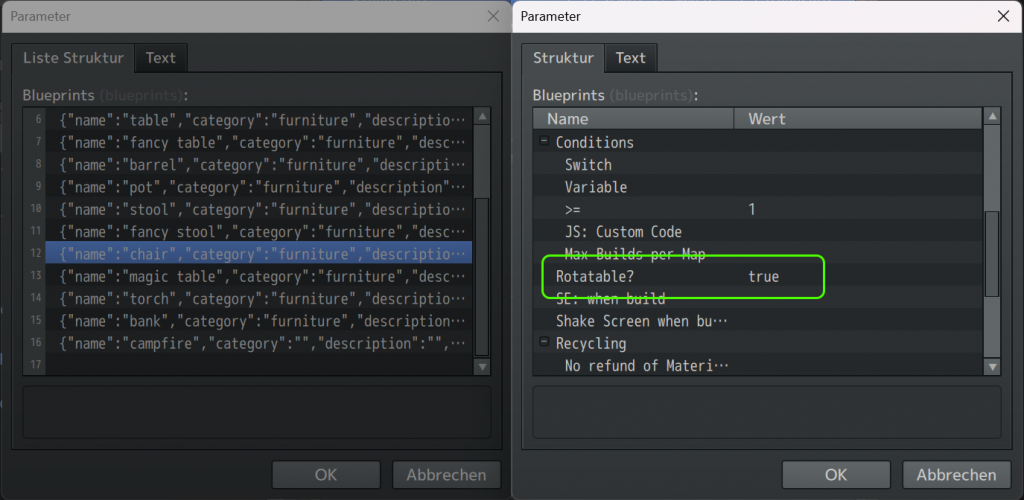
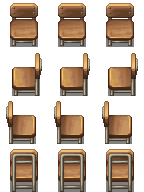
The player can then use the PageUp/PageDown keys to rotate the furniture event while placing. This works by rotating the event itself, so you may need to adjust your character sprites accordingly.
Example:
Build Menu

Use this script to open the build menu, whereas the menu shows only furniture events of the given category (in this example: furniture):
MK.Furniture.openBuildMenu('furniture')Use this script to open the build menu, whereas the menu shows all of the furniture events the player has access to:
MK.Furniture.openBuildMenu()Shovel Mode
When the shovel mode is enabled then the player can transform the map right ahead of them while moving freely.
When the shovel mode is disabled then the player is locked at their position, and the asset is positioned by mouse or arrow keys.


building by arrow keys/mouse
To control the shovel mode, you can use Plugin Commands (MZ only) or these script calls:
MK.Furniture.setShovelMode(true)
OR
MK.Furniture.setShovelMode(false)
Energy/Stamina
You can set stamina costs for each blueprint. To enable the stamina system, you must bind the stamina to a Game Variable in the Plugin Manager.
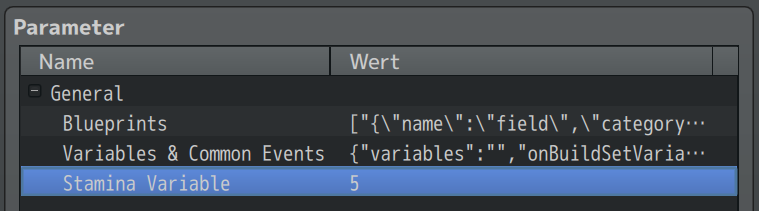
Then, you can define stamina costs for each blueprint in the blueprint section of the Plugin Manager.
The plugin will now do the following:
- The build menu shows the required stamina vs. the player’s stamina
- The plugin checks whether the player has enough stamina to build the selected blueprint
- If not, then a Common Event can be started (usually to show a message „not enough energy!“)
- The plugin decreases the Game Variable by the stamina costs
The plugin does not set or refill your Game Variable at any time, nor does it check whether your Variable is above any limit or drops below 0. It’s up to you to initialize this Variable at game start and to refill it (e.g., when the player rests, gains energy over time, or in other ways).